Tuesday, September 17, 2013

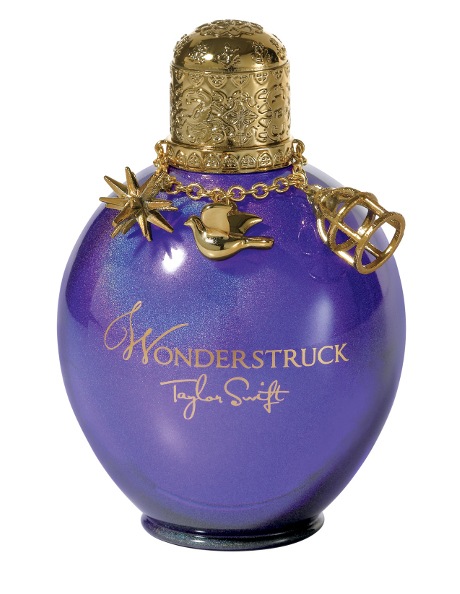
Plan for 'Wonderstruck' perfume portrait


  • Black background
  • Model wearing white
  • 2 lights - 1 rim light, near ground pointing upwards, 1 softbox at front
  • Glitter blown into shot from side, from above head height so it floats down and minimises mess. Glitter also closer to camera than subject, so it blurs out of focus more and reduces amount of glitter on model.
  • Cloth on floor to catch glitter

Photographing Tea...

Had a go and shooting the tea in studio yesterday. Worked for nearly 3 hours and still aren't 100% happy with it. Planning to reshoot in a couple of weeks, once I work out an alternative plan.

Sunday, September 15, 2013

Off Camera Flash Task

Task 1

Expose for subject
ISO 100, 1/60 @ f/4
Expose for sunlit area (I exposed for the sky to get the effect I wanted)
ISO 100, 1/60 @ f/22
Add flash, balance flash and ambient
ISO 100, 1/60 @ f/22
With flash, reduce ambient exposure by 2 stops
ISO 100, 1/250 @ f/22
Task 2

A portrait in the shade
ISO 100, 1/60 @ f/4
With flash
ISO 100, 1/45 @ f/4.5
Reduce ambient exposure by 2 stops
ISO 100, 1/180 @ f/4.5
Task 3

A portrait indoors
ISO 500, 1/60 @ f/2
With flash (bounced off ceiling)
ISO 400, 1/60 @ f/2
Reduce ambient exposure by 2 stops
ISO 400, 1/250 @ f/2

For me, this task looked really easy on paper and then got difficult when I had to put it into practise. I've been experimenting with off camera flash for a few weeks, trying out everything just getting the hang of it. I was finding it quite easy, and I've been achieving some results that I'm very pleased with, but I found that when I had a set of instructions like this to follow I found it much harder and I was much less pleased with my results.

Tuesday, September 3, 2013

Lighting Painting

http://www.gizmodo.com.au/2012/05/these-girls-are-wearing-nothing-but-light/

http://www.flickr.com/photos/purplemattfish/3286862210/


Studio - Small Product Part 2

Beer or Wine
Red wine. Backlit, like this:
http://static3.depositphotos.com/1006126/208/i/950/depositphotos_2088787-Backlit-wine-bottle.jpg
Electronic Household Device
Non-chrome kettle.

Product of your choice
T2 tea, with teapot and cup (see separate post).

Monday, September 2, 2013

Small Product Test shot


This is the set up I'm thinking of using for one of my product shots. I wanted to test it out at home before getting into the studio, so I using my Speedlite inside a white paper bag to act as a softbox and just played around with compositions and lighting. This is the one I like best, with the light directly above.
This is not the particular tea that I'm planning to use - the one I'll be using is called Oolong Chocolate Chai.
I also want to add some loose tea coming out of the cup, and onto the table. And possibly some pieces of chocolate too.

Saturday, August 31, 2013

Assignment 4 - Proposal

Corporate

Individual

  • Who: Alison, business manager at Resolution Consulting
  • Look/ Feel: Open and friendly (as any good corporate portrait should be)
  • Location: This shoot will be done at her house, where she works. Either with her sitting at her desk (which in a corner of a room), or near a window.
  • Equipment: Camera, 60mm lens, Speedlite
  • Lighting: If shooting at desk, have flash as the main light source probably bounced off wall or ceiling to defuse light. If shooting near window, use window light as the main light source, with flash as fill.
Group
  • Who: Alison, Pete, and Paul, Resolution Consulting staff
  • Look/Feel: Same as above, with the added feel of a team that is comfortable with each other and works well together
  • Location: Their house, where the business is based, in their office which has a window on one side.
  • Equipment: Camera, 17-85mm lens, tripod, Monobloc kit
  • Lighting: Using the flash as the main light source, with fill coming from the window and possibly a reflector as well. Would use 2 Monobloc lights with umbrella or bounced off wall/ceiling. As for posing, I'm thinking there is the issue of height - Paul is much taller than the other two, so I would want him either sitting in a chair or perhaps sitting/leaning on the desk. Will experiment with posing on the day of course, but would probably start with Alison in the middle and then play around.

Creative
  • Who: Noemie, young actor, singer, and flutist
  • Look/Feel: I can't quite articulate what feel I want yet...I have a couple of different ideas that are still forming, and will probably shoot both of them to see which one works best. But I want her to look impressive, like she is perhaps a member of an orchestra, so I guess the look will be quite classical, but the location adds a slightly grungier feel. 
  • Location: I have found the exact spot I want to shoot this...

It is located in the ditch next to the Tuggeranong Parkway, between it and houses in Weston. There are steep rocky cliff-like sides to this ditch...

I walked along the whole length of it yesterday to find the best spots for this shoot. I like the spot with the tiny stream, and rocks next to it.
  • Equipment: Camera, 17-85mm + 60mm lenses, tripod, Monobloc kit
  • Lighting: Shot in either the evening or early morning so that flash is the main light source. 2-3 Monobloc lights.
  • Other Ideas: I want to include Noemie's flute in the shoot, whether she's playing it or holding it. I also want her wearing a long flowing dress, with LOTS of fabric - this may end up being extra fabric attached to the dress. I'm also trying to get hold some hair accessories that have feathers...but that's not essential.
  • I want to take both full length and half body shots, basically treat it like a shoot for a magazine and make sure there's lots of variety.

Environmental

#1
  • Who: Graham, my dad
  • Look/Feel: Light, happy, inviting, engaging
  • Location: His vegie garden
  • Equipment: Camera, 60mm lens, Speedlite
  • Lighting: Shot in late afternoon/early evening, with sunlight shining through blossom trees behind garden. Have him bending over vegies, maybe crouched down planting a seedling. Use Speedlite to fill in light on the face.
#2
  • Who: Rebecca, a rower
  • Look/Feel: I want it to look like the subject is very comfortable in her surroundings (which she is). I also want her to look like a regular girl "just like you".
  • Location: By Lake Burley Griffin, or inside a boat shed
  • Equipment: Camera, 60mm lens, Speedlite, Reflector
  • Lighting: If by the lake shoot in evening with sunset acting as rim lighting, with flash filling in face. If in boat shed use flash as main light source with reflector used for fill. Whether we can get access to the boat shed has yet to be confirmed, and I can't plan the lighting properly until I get there and assess how much natural light there is.
#3
  • Who: Christa, with her two BIG dogs!
  • Look/Feel: Fun, "smiley", putting emphasis on how big the dogs are
  • Location: Outdoor location, on Christa's property
  • Equipment: Camera, 17-85mm lens, Speedlite, reflector, dog treats??
  • Lighting: Shot from a low angle looking up at the dogs, with one dog on each side of Christa. Preferably shot on an overcast day so the ambient light is more even, and then focusing the eye on the subjects by using flash to illuminate them more than the background.

Thursday, August 29, 2013

Assignment 4 - Creative Research

For my creative portrait I made a Pinterest board so I could easily gather inspiration together in one place: http://pinterest.com/rosiemoonshine/creative-portrait-inspiration/

Studio - Small Product Part 1

Creating an ad...

I've chosen my product for this assignment:
http://www.myer.com.au/shop/mystore/973607510
I bought this perfume mainly because I loved the bottle (although it smells nice too), so I'm thrilled at the opportunity to photograph it. It's a very sparkly bottle, so I've been trying to think of ways to add sparkle to the portrait without using extensive Photoshop.
This is an original ad for the perfume:
http://images.memsaab.com/files/imagecache/node-gallery-display-750/files/2012/98289/taylor-swift-perfume-ad-pic.png
Obviously, the advertisers had the same idea as I did and wanted to add sparkle. They, however, used all Photoshop sparkle and I don't like this look so much.
I want to try and create REAL sparkle, and I want to attempt to do that using...wait for it......glitter!!

http://lillypillyphotography.files.wordpress.com/2012/02/project51.jpg
I don't want the model blowing glitter, but an assistant out of frame blowing glitter inwards around the model. Using flash will enable me to freeze the glitter in mid-air very easily.
This will no doubt take a lot of trial and error to get right, and will also be quite messy...so I propose putting down fabric over the floor to aid the clean up process.

As for the model...
I have yet to choose and finalise a model, but they do not have to be a Taylor Swift lookalike :P
I would, however, like to achieve the same facial expression as in this shot - another promotional image for Wonderstruck:
http://www.flare.com/wp-content/uploads/2011/11/d3ab6ffc48dcaebe22016219e8a9.jpg
With possibly a bit more of a smile...

Now for lighting!
I quite like the lighting in the first example of a Wonderstruck add. I think rim lighting would be hugely important to getting the effect that I want, and then another light (stripbox) at the front slightly to one side:

Studio - Assignment 1 Portraiture

Task 1

I just came across this image (below) and am really taken with it. Looks pretty simple lighting wise...
http://fotos-2go.com/page/2

I reckon this is how it's lit. I suspect there may be two lights one above the other to give enough coverage.


Task 2
For this portrait I'm really keen to experiment with sparklers...
http://8020.photos.jpgmag.com/2026561_169740_8de107da04_p.jpg

http://denniscalvert.net/blog/wp-content/uploads/2013/01/G46A0064.jpg
It'd be a portrait obviously, but I like the effect they've achieved in this product shot.
Maybe even making a halo with sparklers...

http://www.flickr.com/photos/39894655@N02/4775755539/
Or a skirt...

http://www.flickr.com/photos/cierra12/7146127551/
Obviously this has not been done with sparklers. Actually it was all done in Photoshop, but it's just an idea.

Studio - Inspiration

Love this idea. Would love to use it for the ad we have to create, but I have too many other ideas :P Someone else should do it though, coz it's totally cool :)
http://www.flickr.com/photos/ana-ana-ana/8742348146/


Wednesday, August 28, 2013

Assignment 4 - Corporate Research

http://www.gavinblue.com/#/8/1

http://lizsnedker.wordpress.com/2011/09/30/september-2011/
http://vaniepoyey.com/headshot-photography/corporate-headshots-and-executive-portraits-at-the-camden-group-los-angeles

Assignment 4 - Enviromental/Editoral Research

http://clonephotography.weebly.com/5-portrait-typestheme.html
http://www.gavinblue.com/#/10/10
Reading
http://digital-photography-school.com/environmental-portraits#ixzz1kZjePW9A

http://cpsstephen.blogspot.com.au/2012/10/good-environmental-portraits.html
http://www.aaronleefineman.com/portfolio/06.html

Sunday, August 18, 2013

Location Task 4 - Fill Flash

Task 1 - Take a portrait outdoors, with side-lit sun.

1. Determine exposure for sunlit area of subject
1/1000 @ f2.8

 2. Set the aperture of the lens to 1/2 stops below the value of the aperture calculated using GN/distance. Adjust shutter speed to match new exposure.

1/15 @ f22
As an experiment, I took another shot with the aperture as is using the GN/distance equation. I felt like the side of the face that was in shadow was still a little too dark.

1/15 @ f16
However, it seems that my camera screen does not portray the images very accurately, as this second image is far too overexposed. I have noticed that the camera screen does not render the images the same way my laptop screen does, but I'm still learning what the differences actually are so I can start to compensate.

Task 2 - Take a portrait in a shaded area, at 2 meters, flash set to half power.

My flash does not have a half power option - the next level down from full power is 1/4 power. I used my flash at full power for this exercise, as 1/4 did not provide enough light to expose the scene properly.

1. Determine exposure by using GN/distance

1/250 @ f11
2. Take the portrait again, but increase the ambient exposure by 2 stops

1/60 @ f11
3. Retake the portrait increasing the ambient exposure by a further stop of exposure

1/30 @ f11
The 3rd image is my personal favourite from this exercise. I prefer that balance of flash and ambient.


Task 3 - Window light portrait
My flash does not have TTL or flash exposure compensation so I experimented with the "auto" modes - all these modes actually do is reduce the flash power by 1/4, 1/8 and 1/16.

1. Photograph a window light portrait without flash

1/80 @ f2
2. Retake the portrait bouncing flash off the roof on the opposite side to the window

1/80 @ f2.2
The aperture must have got bumped to f2.2 because I have no memory of changing it!! However, the second image (with flash) is much better exposed than the first (without flash.